Every paid plan + free sample
Make your words visible.
Add automatic, word-timed captions in four styles, and download SRT or VTT subtitles for each clip. Help people follow along when they watch without sound.
A little editing. A lot more possibility.
Turn your footage into social-ready videos. Add automatic captions, reframe, remove silent gaps, or split. You choose the finish.
Try one 3-minute captioned video. No card.
Captions and 1080p from $9/month.
Made for solo creators & small businesses.
TikTok · Instagram Reels · YouTube Shorts
A few choices between the video on your device and the one you want to share.
Pick a file from your device. Start with a tip, a tutorial, or a moment worth sharing.
Set the format and available finishing options. Keep it whole or choose your clips.
Get an MP4 or a ZIP of clips, ready for you to upload to your social channels.
Less guesswork. More “I can do that.”
One quick tour. Two real examples.
Take a look before you upload your own.
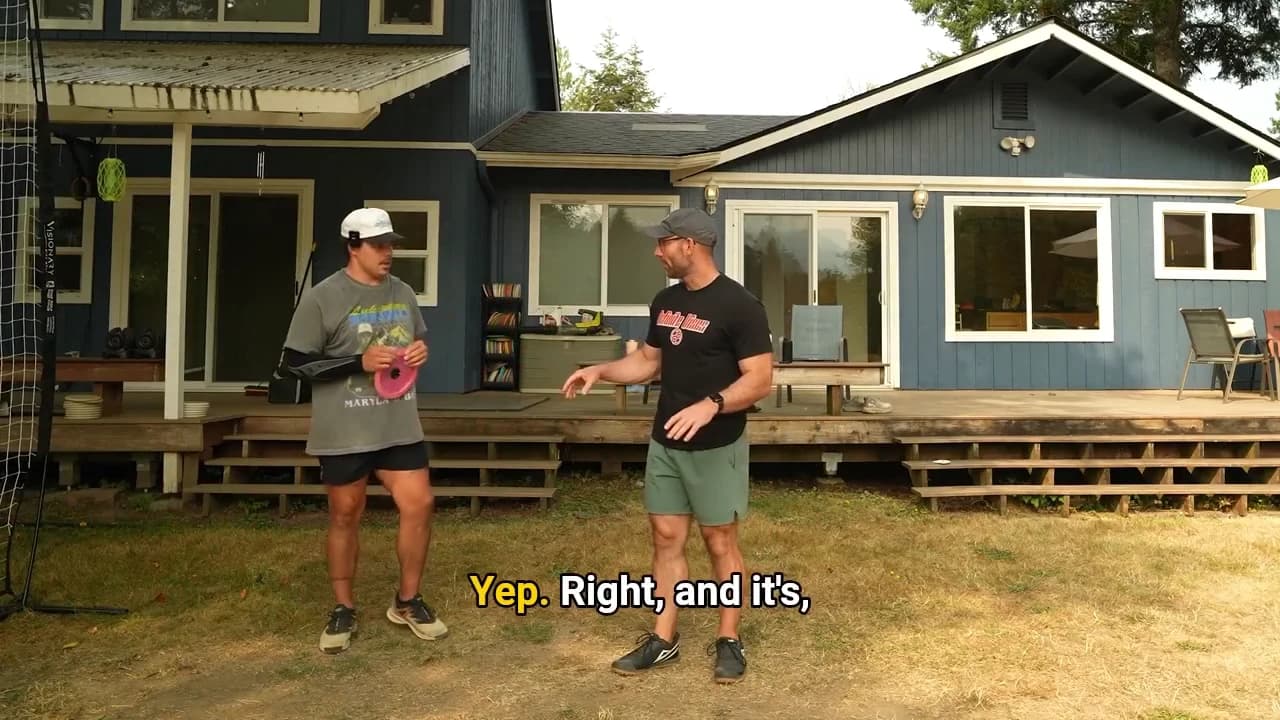
Watch automatic captions follow the spoken words in a disc-golf lesson. The active word is highlighted as the conversation moves.
A 21-second excerpt of real captioned output. Auto captions are included on every paid plan and in the free sample. Sound is available through the player’s volume control.
Open the automatic caption exampleThe 15-second quick tour combines two earlier app recordings: choosing portrait output, turning on automatic captions, removing silent gaps, stitching, and downloading completed jobs. The recorded crossfade option is unavailable in the current plans, which use hard cuts. Zooms and transitions guide your attention. Processing time is omitted.
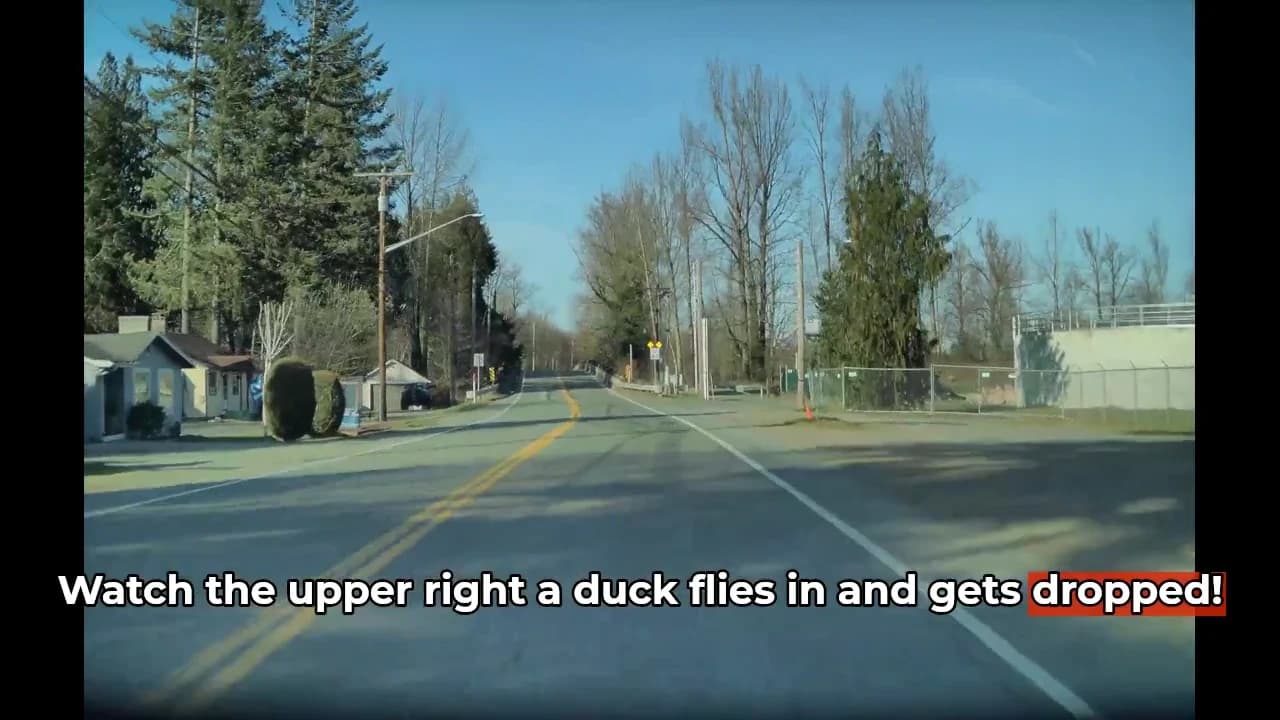
The finished dashcam example takes five seconds from a one-minute source video. A bird crosses a tree-lined road. Manually added text reads “Watch the upper right a duck flies in and gets dropped!” with the final word highlighted red. It is silent.
The automatic caption example is the first 21 seconds of a longer disc-golf lesson. Two people demonstrate a pulling movement outside a house. Captions display their conversation with the spoken word highlighted yellow. The original audio is included.
Open any example directly: interface tour, dashcam clip, or automatic captions.
Use just what your video needs. Splitting is always optional.
Every paid plan + free sample
Add automatic, word-timed captions in four styles, and download SRT or VTT subtitles for each clip. Help people follow along when they watch without sound.
Every plan. Smart Reframe on paid plans.
Choose portrait or landscape. Use blurred fill, or let Smart Reframe choose a crop from the movement in your clip.
Smart Reframe falls back to blur when a scene is too still.
Every paid plan
Remove silent gaps with gentle, normal, or aggressive tightening. Choose the rhythm that suits your video.
Pick exact time ranges and add your own text on Creator. Join videos and highlight individual words on Pro.
Find your planChoose the tools you need, with clear monthly limits. Currently available in the United States.
Try one 3-minute video, up to 150 MB, with 720p captions and blurred fill. Save the result within one hour.
Caption, reframe and finish your next few posts.
$9/month
Choose StarterMore room for a regular posting routine.
$15/month
Choose CreatorMore finished footage, plus advanced text and stitching.
$25/month
Choose ProA 10-minute whole video uses 20 credits at 1080p, or 30 with silence removal. Captions are included. All plans have source-duration, file, job and generated-output limits. See the full pricing details before choosing your plan.
Before your first upload
Clear answers, so you know what to expect.
Try one video once: up to 3 minutes and 150 MB, with 720p captions and blurred fill. Download the MP4 and subtitles within one hour. No card required; a verified account is needed and samples are subject to availability.
No. Keep your video in one piece and apply the finishing options available on your plan. Splitting is optional.
The disc-golf lesson shows automatic, word-timed captions. The dashcam clip uses manually entered text and Pro word highlighting. Automatic captions are included on every paid plan, starting at $9/month, and in the free sample.
You choose what to keep. Split by duration, divide into equal parts, or enter specific time ranges. EasyVideoClips does not automatically select highlights or predict which clips will go viral.
A single output is an MP4. Multiple clips arrive together in a ZIP. Paid plans offer 720p or 1080p in portrait or landscape; the free sample is 720p. Video Stitch keeps the first video’s dimensions. Captioned jobs also include separate SRT and VTT subtitle downloads. You download the files and upload them to your social channels.
Processing credits measure the work: whole videos use 1 credit/minute at 720p or 2 at 1080p; silence removal adds 1 per original source minute. Captions are included. Source-upload bytes, generated results and job counts also have monthly limits. We show your estimate before upload; this is not permanent cloud storage.
Use H.264 MP4 or MOV footage up to 1080p and 30fps, with AAC audio or no audio. Convert 4K, HDR, HEVC and higher-frame-rate footage first. Each plan also limits source duration and file size.
It depends on your video length, selected options and the current workload. You can check your job status in the dashboard. The interface reel combines short feature highlights and is not a real-time processing demonstration.
Downloads are available for one hour on Free, 24 hours on Starter, 48 hours on Creator and seven days on Pro. Save your results before they expire.
The service is currently available in the United States. Visitors outside the US can join the waitlist on the signup page.
Start with one video. See what you can make of it.
Start free One lifetime sample · 3 min / 150 MB · No card